Template Item
By Arunkumar Ganesan on December 25, 2022
ExpertA Template Item is a reference Item which will hold different Item Attributes like High Voltage, Low Voltage, Vector Group, Impedance, etc.
Eg: Suppose Transformer DTTHZ2N is an Item and the design and price of the transformer is different for High Voltage with value like 10, 20 and 21(kV) and Low Voltage with value like 400 and 420(V) respectively. In LENS Core the Transformer DTTHZ2N will be considered as a template Item and each of the variations will be a Variant Item .
A 10(kV) Transformer is a subversion of the Transformer DTTHZ2N. Variant Items let you treat the 10, 20 and 21(kV) versions of a Transformer as variations of one Item 'DTTHZ2N'.
Without Item variants, you would have to treat the 10, 20 and 21(kV) versions of a DTTHZ2N as three separate Items.
To Access Template Item:
Home > Offer > Item > enable the checkbox "Has Variants"
Choose from the filtered list of Template items
1. Using Item Variants
Variants can be based on two things:
- Item Attributes - In SGBCZ we use this option
- Manufacturers
Tip: Once an item template is created, when you update this template, all the variants are also updated accordingly.
1.1 Creating the Template Item
- To use Variant Item in LENS Core, create an Item and tick 'Has Variants' under Variants.
- The Item then shall be referred to as a so-called 'Template'. Such a Template is not identical to a regular 'Item' any longer. For example, it (the Template) cannot be used directly in Offer
- Only the Variants of the Item (eg: 20(kV) DTTHZ2N with Low Voltage 420) can be practically used. Therefore it would be ideal to decide whether an item 'Has Variants' or not directly when creating it.
- On selecting 'Has Variants' a table will appear. Specify the variant attributes for the Item in the table. In case the attribute has Numeric Values, you can specify the range and create intervals based on the increment values.
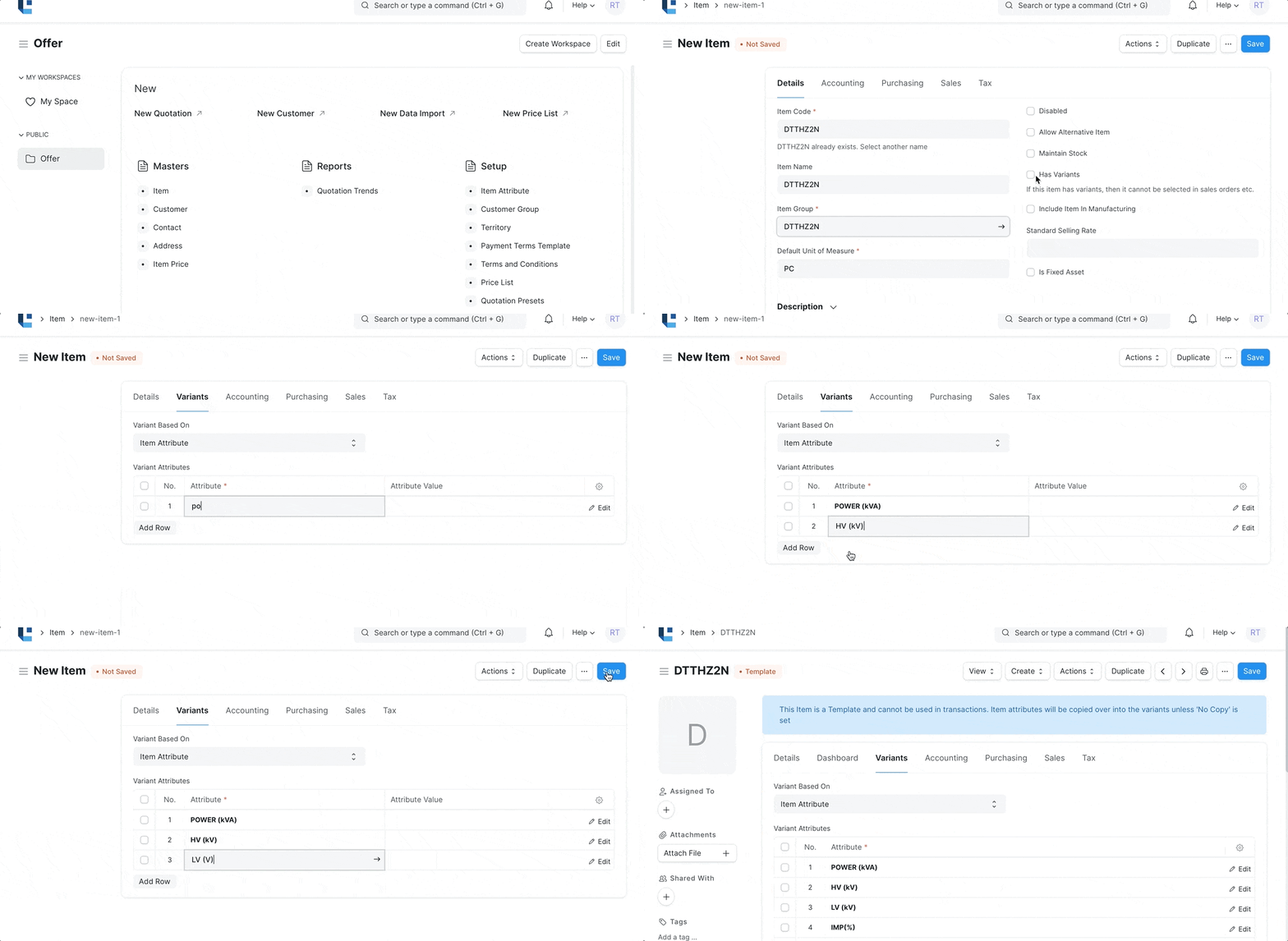
1.2 Variant Item
A Variant Item can be created against a 'Template Item'. Only during the creation of the Variant the attributes can be assigned with values. A Price can be assigned to this variant. Only Variant Item can be used in the Offer. Refer to Variant Item for more details
No comments yet. Login to start a new discussion Start a new discussion