Customer Group
By Administrator on December 19, 2022
BeginnerCustomer Group is an aggregation of customers based on Country for SGBCZ
Customer groups allow you to organize your customers.
You can define a price a list, Payment Terms Template, Default Warranty and Packaging information which will be automatically applied to all customers belonging to that group. You can also get trend analysis for each group. You can add your own customer groups based on your requirement like Germany, Spain, Austria etc.
To access the Customer Group, go to:
Home > Offer > Setup > Customer Group
1. Prerequisites
Before creating Customer Group, it is advised that you create the following first:
2. How to Create a new Customer Group
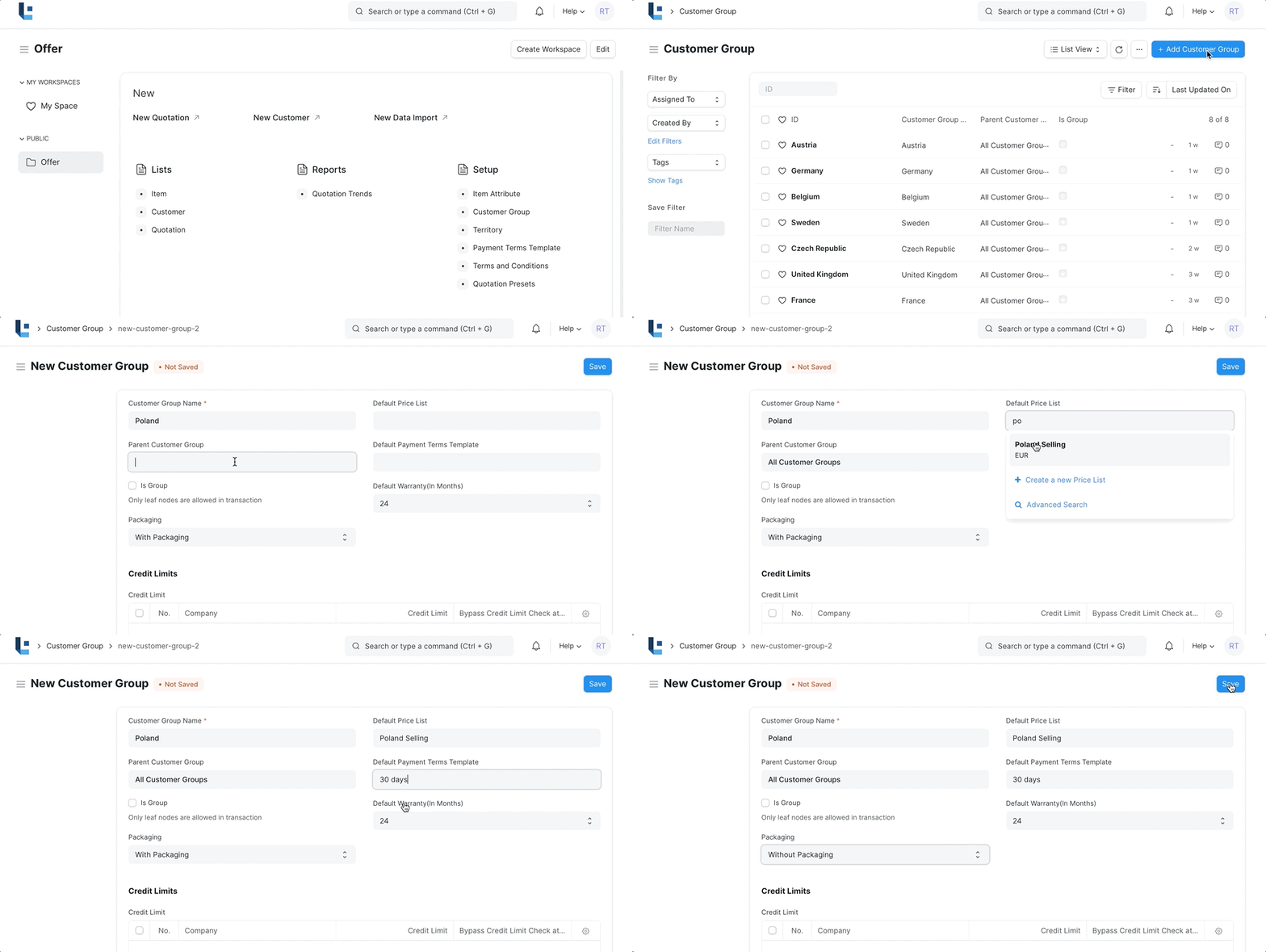
- In the Customer group List click on Add Customer group
- Give the Customer group the Country Name. eg Poland
- Select the Parent Group as 'All Customer Group'
- Assign a Default Price List, Default Payment Terms Template, Default Warranty and Packaging Details
- Click Save.
3. Features
3.1 Assign Credit Limit, Default Price List, Default Payment Terms Template ,Default Warranty and Packaging Details
You can assign the credit limit, Price List, Payment Terms, Warranty and Packaging so that they will be automatically applied when a customer belonging to the customer group is selected in Offer(Quotation).
No comments yet. Login to start a new discussion Start a new discussion